


React Native is a JavaScript framework for writing real, natively rendering mobile applications for iOS and Android.Similar to React for the Web, React Native applications are written using a mixture of JavaScript and XML-esque markup, known as JSX. Then, under the hood, the React Native "bridge" invokes the native rendering APIs in Objective-C (for iOS) or Java (for Android). Thus, your application will render using real mobile UI components, not webviews, and will look and feel like any other mobile application. React Native also exposes JavaScript interfaces for platform APIs, so your React Native apps can access platform features like the phone camera, or the user's location.
To create a react-native application:
- Run the following command in command prompt: react-native init myApp
Smartphone Cameras:
Now a days smartphone cameras are not only used for snapping photos or recording videos, but also for many purposes like Scanning Documents and Barcodes, Translating Text from one language to another, Augmented Reality Entertainment, etc... The list does not end here and it gets bigger day by day. So use of camera has become very vital these days.
We may also need to implement camera in our native mobile applications. By default, our smartphone manufacturers lock the orientation of the default camera, but the icons used alone will change according to orientation. But the package in react-native does not lock the orientation by default, which may cause the app unstable often. So we need to lock the orientation and we can change the icons alone according to orientation.
In order to use camera in our app we need to install any camera package. One of the most famous and widely used & stable package is react-native-camera.
Installation:
npm install react-native-camera --save
react-native link react-native-camera
Orientation:
We need a separate package which allows us to lock the orientation of our app & one of the most famous and most used & stable package for it is react-native-orientation-locker. One more advantage of this package is, we could lock the orientation of particular page or component alone.
Real-time Usage:
- There might be need to lock the orientation of a single page alone.
We might need to design UI inside the camera component but do not want the responsiveness to be spoiled.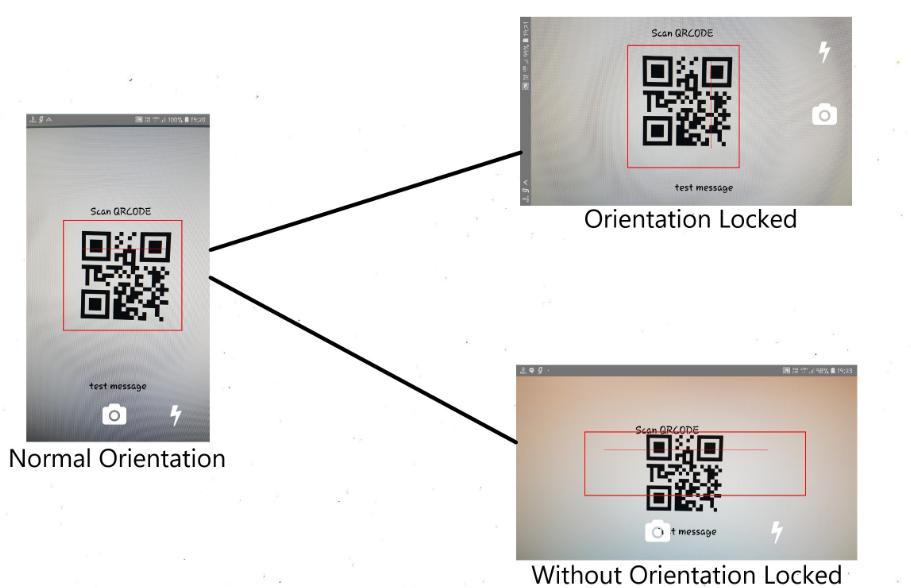
Installation:
npm install react-native-orientation-locker --save
react-native link react-native-orientation-locker
Configuration:
Please refer configuration for ios and android configuration.
Implementation:
We need to import the package in order to use the functions available in that package, so import the camera and orientation package.
import Orientation from "react-native-orientation-locker"; import { RNCamera } from 'react-native-camera';
After importing the initial step which needs to be done is, locking the orientation of the particular page or component to Portrait. There are few built-in functions in react-native-orientation-locker.
- lockToPortrait()
- lockToLandscape()
- lockToLandscapeLeft()
- lockToLandscapeRight()
We could use any of these functions based on our requirement, here we need to lock the screen in Portrait, so we will stick to lockToPortrait(). This must be invoked in constructor or componentWillMount as it should be triggered before rendering. As these functions come with react-native-orientation-locker, we need to invoke using the object in which we had imported the package(Orientation).
Next, Create orientation events to find the device orientation. Create the listener in either constructor or componentWillMount, as it should be initialized before the component is rendered.
componentWillMount() {
    Orientation.lockToPortrait();
    Orientation.addDeviceOrientationListener(
    this._addDeviceOrientationListener.bind(this)
  );
}
Listener:
_addDeviceOrientationListener(deviceOrientation) {
  this.setState({ orientation: deviceOrientation });
}
When device orientation is changed, callback function will be called. When lockToXXX is called, callback function also can be called. It can return either
- PORTRAIT
- LANDSCAPE-LEFT
- LANDSCAPE-RIGHT
- PORTRAIT-UPSIDEDOWN
- UNKNOWN
Do not forget to remove the event listener and unlock the orientation when the component is removed. Remove it in componentWillUnmount as it will be invoked when the component is being removed.
componentWillUnmount() {
  Orientation.removeDeviceOrientationListener(
    this._addDeviceOrientationListener
  );
  Orientation.unlockAllOrientations();
}
Rendering the camera:
<RNCamera
  ref={ref =>{
    this.camera = ref;
  }}
  style={{
    flex: 1,
   width: '100%',
  }}
/>
Rendering capture and flash buttons based on device's orientation in the camera:
import React, { Component } from 'react';
import { StyleSheet, View, TouchableOpacity, Dimensions, Text } from "react-native";
import Orientation from "react-native-orientation-locker";
import FontAwesome from "react-native-vector-icons/FontAwesome";
import { RNCamera } from 'react-native-camera';
import QRCodeScanner from 'react-native-qrcode-scanner';
import Icon from 'react-native-vector-icons/Ionicons';
import * as Animatable from 'react-native-animatable';

const SCREEN_HEIGHT = Dimensions.get('window').height;
const SCREEN_WIDTH = Dimensions.get('window').width;

export default class App extends Component<Props> {

    constructor() {
        super();
        this.state = {
            orientation: "Portrait",
            barcode:""
        };
    }

    componentWillMount() {
        Orientation.lockToPortrait();
        Orientation.addDeviceOrientationListener(
            this._addDeviceOrientationListener.bind(this)
        );
    }

    componentWillUnmount() {
        Orientation.removeDeviceOrientationListener(
            this._addDeviceOrientationListener
        );
    }

    _addDeviceOrientationListener(deviceOrientation) {
        this.setState({ orientation: deviceOrientation })
    }

	makeSlideOutTranslation(translationType, fromValue) {
		return {
			from: {
				[translationType]: SCREEN_WIDTH * -0.18
			},
			to: {
				[translationType]: fromValue
			}
		};
	}

    onBarCodeRead = (e) => {
        this.setState({barcode:e.data})
    }

    render() {
        return (
            <View style={style.container}>
                <RNCamera
                    onBarCodeRead={this.onBarCodeRead}
                    ref={ref => {
                        this.camera = ref;
                    }}
                    style={{
                        flex: 1,
                        width: '100%',
                    }}
                >
                 <Text style={{
						...style.scanText,
						top:
							this.state.orientation == 'LANDSCAPE-LEFT'
							|| this.state.orientation == 'LANDSCAPE-RIGHT' ?'45%':'25%',
						left:
							this.state.orientation == 'LANDSCAPE-LEFT' ? '75%' :
								this.state.orientation == 'LANDSCAPE-RIGHT' ? '-5%' : '35%',
						transform: [{
								rotate: this.state.orientation == 'LANDSCAPE-LEFT' ? '90deg' :
									this.state.orientation == 'LANDSCAPE-RIGHT' ? '270deg' : '0deg'
						}]
					}}>
						Scan QRCODE
					</Text>
					<View style={style.scanView}>
						<Animatable.View
							style={style.scanBar}
							direction="alternate-reverse"
							iterationCount="infinite"
							duration={1700}
							easing="linear"
							animation={this.makeSlideOutTranslation('translateY', SCREEN_WIDTH * -0.54)}
						/>
					</View>
					<Text style={{
						alignSelf:'center',
						fontSize:25,
						color: '#000',
						justifyContent: 'center',
						top:
							this.state.orientation == 'LANDSCAPE-LEFT'
							|| this.state.orientation == 'LANDSCAPE-RIGHT' ? SCREEN_HEIGHT/2:'80%',
						left:
							this.state.orientation == 'LANDSCAPE-LEFT' ? '-40%' :
							this.state.orientation == 'LANDSCAPE-RIGHT' ? '40%' : '0%',
						transform: [{
							rotate: this.state.orientation == 'LANDSCAPE-LEFT' ? '90deg' :
							this.state.orientation == 'LANDSCAPE-RIGHT' ? '270deg' : '0deg'
						}],
					}}>
						{this.state.barcode}
					</Text>
				</RNCamera>
				<View style={style.cameraIcon}>
					<TouchableOpacity style={{
						...style.capture,
						transform: [{
							rotate: this.state.orientation == 'LANDSCAPE-LEFT' ? '90deg' :
							this.state.orientation == 'LANDSCAPE-RIGHT' ? '270deg' : '0deg'
						}]
					}}>
						<FontAwesome name='camera' color={'white'} size={50} />
					</TouchableOpacity>
				</View>
				<View style={style.flashIcon}>
					<TouchableOpacity style={{
						...style.capture,
						transform: [{
							rotate: this.state.orientation == 'LANDSCAPE-LEFT' ? '90deg' :
							this.state.orientation == 'LANDSCAPE-RIGHT' ? '270deg' : '0deg'
						}]
					}}>
						<FontAwesome name='bolt' color={'white'} size={50} />
					</TouchableOpacity>
				</View>
			</View>
		);
	}
}

        );
    }
}<br><br>const style = {
container: {
flex: 1,
flexDirection: "column",
backgroundColor: "black"
},
scanBar: {
width: '78%',
height: 1,
backgroundColor: 'red',
marginLeft:30,
marginTop:300
},
scanText:{
position: 'absolute',
fontSize:25,
color: '#000',
justifyContent: 'center',
},
scanView:{
borderWidth: 2,
position: 'absolute',
top:'30%',
left:'20%',
borderColor: '#F00',
justifyContent: 'center',
backgroundColor: 'rgba(255, 255, 255, 0.9)',
padding: 10,
width:'65%',
height:'35%',
backgroundColor:'transparent'
},
preview: {
flex: 1,
justifyContent: "flex-end",
alignItems: "center"
},
capture: {
flex: 0,
padding: 15,
alignSelf: "center",
margin: 20
},
cameraIcon: {
position: 'absolute',
bottom: 0,
left: '33%'
},
flashIcon:{
position: 'absolute',
bottom: 0,
left: '70%'
}
};