



Mitrahsoft
  • SERVICES
    • OUR SERVICES
      • SOFTWARE DEVELOPMENT
      • MOBILE DEVELOPMENT
      • BLOCKCHAIN DEVELOPMENT
      • SOFTWARE TESTING
      • CLOUD & DEVOPS SERVICES
      • PRODUCT DEVELOPMENT
      • OFFSHORE DEVELOPMENT
      • SOCIAL MEDIA MARKETING
      TECHNOLOGIES
      • COLDFUSION DEVELOPMENT
      • REACTJS DEVELOPMENT
      • VUEJS DEVELOPMENT
      • ANGULAR DEVELOPMENT
      • NODEJS DEVELOPMENT
      • PYTHON DEVELOPMENT
      • GOLANG DEVELOPMENT
      • GOLANG CORPORATE TRAINING
      COLDFUSION EXPERTISE
      • MURACMS EXPERTISE
      • COLDFUSION APP MIGRATION
      • COLDFUSION HOSTING & SUPPORT
      • CF LEGACY APP MAINTENANCE
      • COLDFUSION REST API
      • ECOMMERCE / SHOPPING CART SOLUTIONS
      • PRESIDECMS EXPERTISE
      MOBILE DEVELOPMENT
      • REACT NATIVE DEVELOPMENT
      • FLUTTER DEVELOPMENT
      • IONIC DEVELOPMENT
      • PHONEGAP DEVELOPMENT
  • ABOUT US
    • ABOUT MITRAHSOFT
    • OUR CLIENTS
    • TESTIMONIALS
    • PORTFOLIO
    • CAREERS
  • CONTACT US
  • BLOG
Adobe Solution PartnerLucee Solution Partner
  • OUR SERVICESSOFTWARE DEVELOPMENTMOBILE DEVELOPMENTBLOCKCHAIN DEVELOPMENTSOFTWARE TESTINGCLOUD & DEVOPS SERVICESPRODUCT DEVELOPMENTOFFSHORE DEVELOPMENTSOCIAL MEDIA MARKETING
    TECHNOLOGIESCOLDFUSION DEVELOPMENTREACTJS DEVELOPMENTVUEJS DEVELOPMENTANGULAR DEVELOPMENTNODEJS DEVELOPMENTPYTHON DEVELOPMENTGOLANG DEVELOPMENTGOLANG CORPORATE TRAINING
    COLDFUSION EXPERTISEMURACMS EXPERTISECOLDFUSION APP MIGRATIONCOLDFUSION HOSTING & SUPPORTCF LEGACY APP MAINTENANCECOLDFUSION REST API ECOMMERCE / SHOPPING CART SOLUTIONSPRESIDECMS EXPERTISE
    MOBILE DEVELOPMENTREACT NATIVE DEVELOPMENTFLUTTER DEVELOPMENTIONIC DEVELOPMENTPHONEGAP DEVELOPMENT
  • ABOUT MITRAHSOFTOUR CLIENTSTESTIMONIALSPORTFOLIOCAREERS
  • CONTACT US
  • BLOG

Creating Pivot Table Report Using ColdFusion And jQuery

HomeBlogCreating Pivot Table Report Using ColdFusion And jQuery
ColdFusionjQuery

Creating Pivot Table Report Using ColdFusion And jQuery

M
Post by MitrahsoftPublished: Nov 18, 2018

In Excel there is a option to make a cell to calculate formulas and display the result like sum, average, etc., into the another cell. We're just thinking that is there any possible to bring the same operation dynamically in table format to display in browser. On that discussion we found the PivotTable.js, which is a JavaScript Pivot Table library with drag'nDrop functionality built on top of jQuery and jQueryUI.

Overview

Using pivot table, we can able to summarize data from the original table. We can also able to calculate count, average, sum or min/max values for numbers which were in a group. Consider original table has salary of each person based on various countries, We can use a pivot table to calculate the average salary in each country (the country is your group) ASAP. BTW Pivot tables are excellent to get your data from the long format into a wide format.

Pivot Tables are one of the most powerful and useful tool. They will save you a lot of time by allowing you to quickly summarize large amounts of data into a meaningful report. Understanding exactly how a pivot table works will really help you unleash the full potential of this amazing tool. This is a good way to quickly see all the values that appear in a field and also find typos, and other inconsistencies

Here we're going to see the basic functionality of how data renders in pivot table. In pivot there are two main functions defined in pivot() and pivotUI(). Please note that pivot() and pivotUI() do not accept the same parameters, and although certain sets of parameters will be parsed similarly by both, this is not generally true. At first clone the pivot js from Nicolas Kruchten Git Repo and link the required JS and CSS files( jQuery, jQueryUI & pivot ).

Demo

In this demo, we're going to see how to render student details from database to pivot table.

index.cfm

cfml
<body>
	<cfoutput>
		<h2 class="text-center">Pivot Table</h2>
		<div id="pivotUI"></div>
		<!--- <img src="http://localhost:8501/cf067/EXERCISE/common/status/pivot/animation.gif"> --->
	</cfoutput>
</body>

<script>
	$(document).ready(function() {
		$.ajax({
			url : 'student.cfc?method=getStudentRecords',
			success:function(data) {
				var studentRecord = JSON.parse(data);
				$('#pivotUI').pivotUI(
					studentRecord, //Here we set the parsed student record into table
					{
						rows: ["Age"], //Table's row assigned to age by default
						cols: ["Department"] //Table's column assigned to department by default
					}
				);
			}
		});
	});
</script>

student.cfc

cfml
<cfcomponent >
	<cffunction name="getStudentRecords" returntype="Array" access="remote" returnformat="JSON">
		<cfset returnData = ArrayNew(1)>
		<cfset ticketStruct = {}>

		<cfquery datasource="pivot_student" name="getStudentRecord">
			SELECT * FROM students
		</cfquery>

		<cfloop query="getStudentRecord">
			<cfset ticketStruct = { "RegID":getStudentRecord.regID, "Name":getStudentRecord.name, 
						"Age":getStudentRecord.age, "Location":getStudentRecord.location, 
						"Department":getStudentRecord.department, "BloodGroup":getStudentRecord.bloodGroup }>

			<cfset arrayAppend( returnData,ticketStruct )>
		</cfloop>

		<cfreturn returnData>
	</cffunction>
</cfcomponent>

In this example, we call remote function to get student details from DB and receive response in JSON format. BTW using that JSON response, the pivot table will get summarized.

Result

There is a two possible ways to display the result via Pivot table.

  • Using pivot()
  • Using pivotUI()

Using Pivot()

If we use "$('#pivotUI').pivot()", the result should be a table format without having any dedicated UI options for drag'n drop and filters.
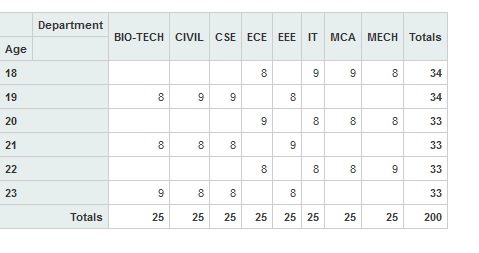
Pivot Result

Using PivotUI()

If we use "$('#pivotUI').pivotUI()", the result should be looks with dedicated UI options for drag'n drop and filter options.
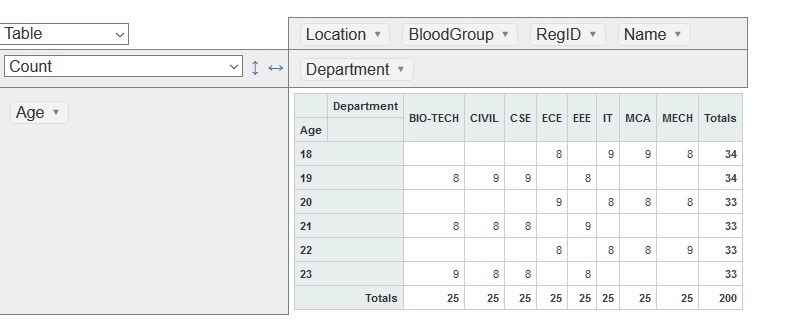
Pivot UI Result

Table format and structures

There are some options and filters to display our report in various formats
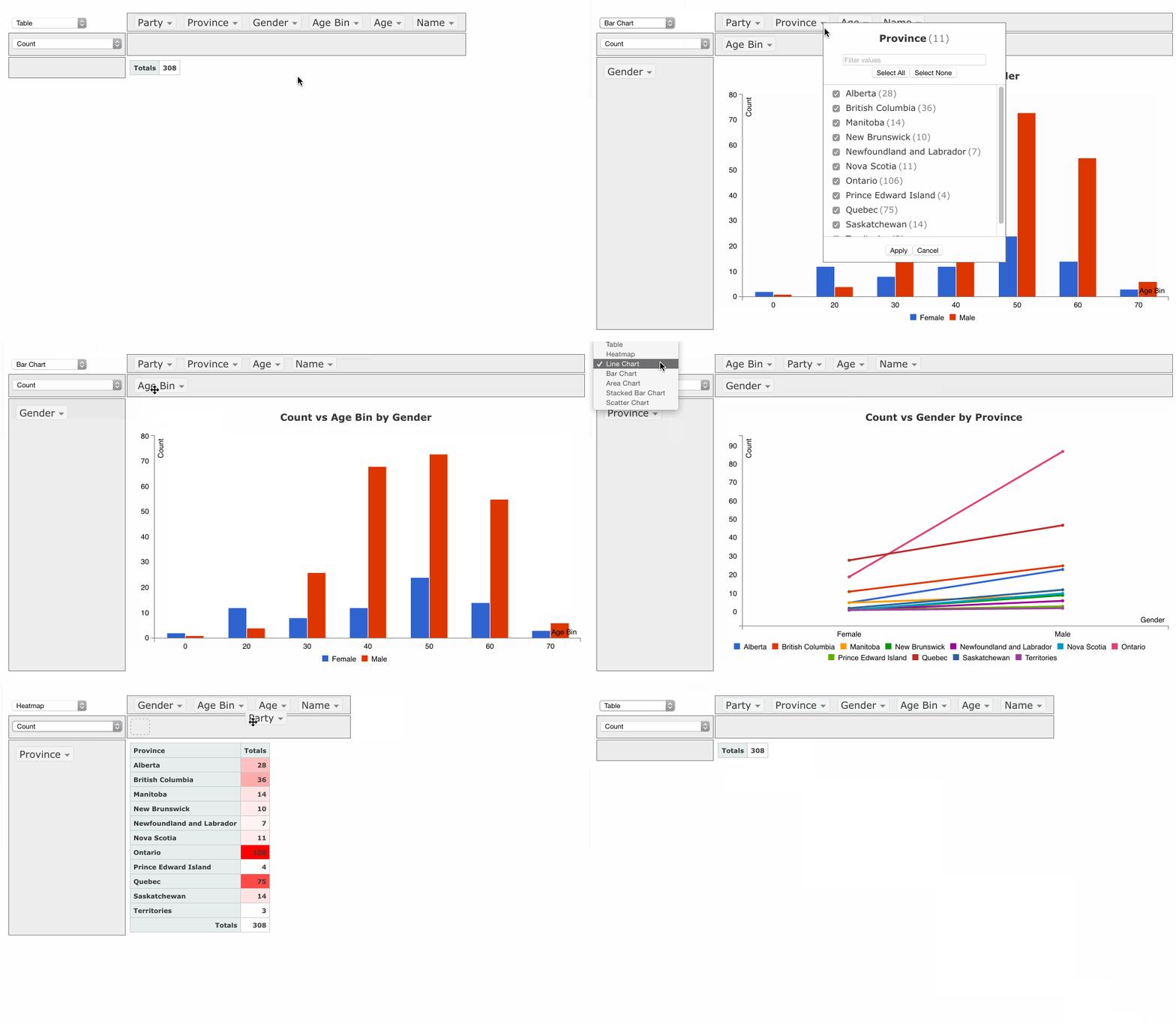
Pivot Table
Hope now clear about some of the basic things in pivot table. For further refer : PivotTable.js

Tags

ADYENAMAZON-SESANDROIDAPACHEAPACHE-JMETERAWSBARCODE-SCANNERCOLDBOXCOLDFUSIONCOLDFUSION-API-INTEGRATIONCOLDFUSIONBUILDERECHARTSEVENT-GATEWAYFFMPEGFW1JQUERYJSOUPLUCEEMURACMSMURACMS-THEMENODEJSONESIGNALOSSPAYFLOW-PROPAYMENT-GATEWAYPAYPALPRESIDECMSPUPPETEERRAILORAZUNAREACTJSREACTNATIVERESTSASS-COMPILATIONSEMANTIC-UISUBLIMETEXTTINYMCETWILIOYUI-LIBRARY

Archives

JAN 20DEC 19AUG 19JUL 19JUN 19MAY 19APR 19MAR 19FEB 19JAN 19DEC 18NOV 18OCT 18MAR 16NOV 15SEP 15MAY 15MAY 14OCT 13JUN 13MAY 13APR 13MAR 13FEB 13JAN 13

Follow us

Mitrahsoft
United StatesUnited States

Hurst, Texas, United States

+1 (817) 606-8684usa-sales@mitrahsoft.com

IndiaIndia

Head Office

126G2/5, Thiru malai nagaram,
Kovilpatti - 628 501

Madurai

1/B, 2nd & 3rd floor, GV Complex,

Bye Pass Road, SS Colony,

Madurai - 625 016

Coimbatore

2nd Floor, Sri Narmadha Towers,

Murugan Nagar Rd, Thoppampatti Pirivu,

 K. Vadamadurai, Coimbatore - 641 017

+91 9092480924

business@mitrahsoft.com

ColdFusion
  • eCommerce / Shopping Cart Solutions
  • Payment Gateway Integrations
  • Shipping API Integrations
  • ColdFusion Development Services
  • REST API Development
  • MuraCMS Plugin Creation & Personalization
Technology Services
  • ReactJS Development
  • VueJS Development
  • AngularJS Development
  • NodeJS API Development
  • Python Development
  • Golang Development
  • React Native Development
  • D3.JS data Visualization
Other Services
  • Software Development
  • Mobile Development
  • Blockchain Development
  • Cloud & Devops Services

Connect with MitrahSoft

Please fill out this field

© 2026 All Rights Reserved. MitrahSoft Solutions Pvt Ltd

Home|About Us|Careers