


In this blog post, we are going to illustrate how to configure and extract HTML content using JSOUP in ColdFusion. JSOUP is a Java based library to work with HTML based content. It provides a very convenient API to extract and manipulate HTML content, using the best of DOM, CSS, and jquery-like selector methods.
if you want to access data from third party applications, reliable way is API access. But if original application provider don't provide any API / SOAP access to us, then we don't have any other option except Web scraping aka HTML Parsing. ColdFusion provided handy cfhttp tag, that will be enough to fetch web site content. Consider there is a list of content in a page which having user details in table format along with web page's header & footer content. scraping only all user information from the whole web page HTML content using string manipulation functions / regular expressions is tedious & time consuming task. There is a neat & easy solution for scraping the data available, that is JSOUP (Java based library - JAR ). Using this JSOUP jar, we can easily traverse, fetch & manipulate particular HTML data from the whole web page content as per our needs.
Local Environment Setup
We are currently using ColdFusion 2016 which is having Java version 1.8.0_72
- Step 1 : Verify Java Version
- Step 2 : Download JSOUP Archive
Step 1 : Verify Java Version
Latest JSOUP jar required java 1.5 or above. So check your JAVA version in ColdFusion admin -> "Settings Summary" tab and confirm whether the version is above 1.5 or else you need to update your JAVA version.
Step 2 : Download JSOUP Archive
Download the latest version of JSOUP jar file from repo, MVN-Repository
Overview
Using JSOUP, we can able to parse HTML content from any web site as per our needs. Here we're going to show a simple demo of parsing top 5 populated countries & that particular country's capital city information from wikipedia web site. List of countries by population page have all Countries and areas ranked by population in a table format, but this page doesn't have the capital city information. So while parsing, we should get the particular country link. Then we have to fetch that country page HTML content & scrape the capital of that country from that child page. This is commonly called as crawling or spidering the web site pages from one page to another.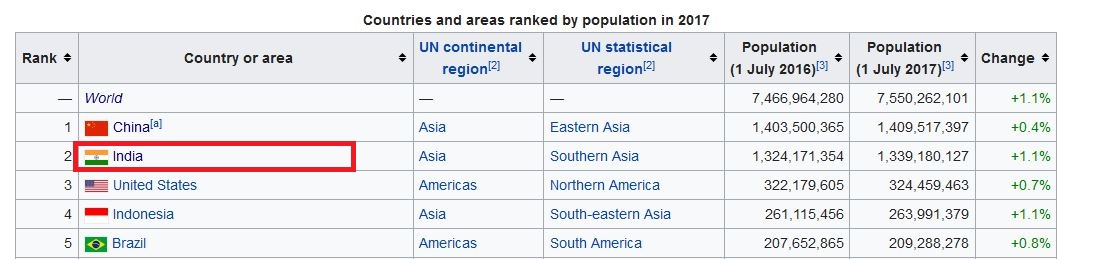 Above is the partial screen shot of parent page which have countries' population information. Capital city information will be available in individual country wiki page, that link available in "Country or area" column in this table. For example, for country India, capital details will be there in Indialink. Like this way, we can able to parse N number of nested pages also and then scrape the needed content from those child pages.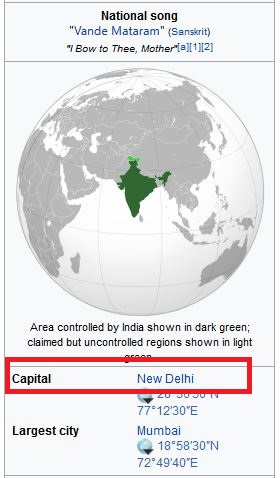
Application files Structure
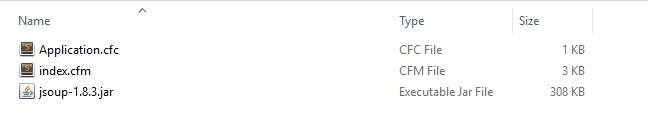
My simple application files structure look like this,
- Application.cfc : Just normal Application.cfc file which having this.javaSettings to load the JSOUP jar file
- index.cfm : Having code to fetching web page content using jSoup & executes the parsing operation
- jsoup-1.8.3.jar : The downloaded JSOUP jar file
jSoup selectors & DOM methods
jSoup provides sufficient enough selectors to find or manipulate elements using a CSS or jQuery-like selector syntax. As well as, it provides DOM methods to navigate a document to extract and manipulate that document data. In our example, we used various jSoup DOM methods like text(), nextElementSibling(), attr()..etc to extract data from the HTML. As well as, used different selectors like th:contains(), table.geography - Class selectors to find particular html element from the document.
Demo files
Application.cfc
component {
	this.name = "Demo_JSOUP_Scrape";

	//Loads the JAR File
	this.javaSettings = {
		loadPaths = [ "#expandPath('./jsoup-1.8.3.jar')#" ],
		reloadOnChange = false
	};
}
index.cfm
<html>
<head>
<title>ColdFusion HTML Parsing using jsoup Demo</title>
<style>table, th, td { border: 1px solid black; }</style>
</head>
<body>
<cfoutput>
<!--- Create JSOUP Object --->
<cfset getJsoup = createObject("java", "org.jsoup.Jsoup")>
<!--- Load the content from the link --->
<cfset parentURL = 'https://en.wikipedia.org/wiki/List_of_countries_by_population_(United_Nations)'>
<cfset getCurrentPageContent = getJsoup.connect(parentURL).get()>
<!--- Load the body content from the full page --->
<cfset getBodyContent = getCurrentPageContent.body()>
<!--- Load the table "Countries and areas ranked by population" content from the age --->
<cfset getTableContent = getBodyContent.select('table')[2].select('tbody')[1].select('tr')>
<!--- Get the table header --->
<cfset tableHeader = getTableContent.select('th')>
<!--- Display the top 30 selected number of records including header record --->
<cfset tableDataCount = 32>
<!--- Get title of the web page --->
<h2>Site Title : #getCurrentPageContent.title()#</h2>
<!--- Get URL location of the web page --->
<h2>Site Location : #getCurrentPageContent.location()#</h2>
<table>
<thead>
<tr>
<!--- Start looping the table header --->
<cfloop array="#tableHeader#" index="j">
<th>#j.text()#</th>
</cfloop>
<th>Capital</th>
</tr>
</thead>
<tbody>
<cfloop index="i" from="2" to="#tableDataCount#">
<!--- Get the current table row from the whole content --->
<cfset currentRowDetail = getTableContent[i].select('td')>
<tr>
<!--- Loop the table current row to fetch the table data --->
<cfloop array="#currentRowDetail#" index="k">
<td>#k.text()#</td>
</cfloop>
<cftry>
<cfset anchorTagToGetCapital = 'https://en.wikipedia.org'¤tRowDetail[2].select('a')[1].attr('href')>
<!--- Load the particular country page & fetch the capital name for that country page
( For eg: https://en.wikipedia.org/wiki/India ) --->
<cfset countryPageHTML = getJsoup.connect(anchorTagToGetCapital).get().body()>
<cfset capitalOfCountry = countryPageHTML.select('table.geography th:contains(Capital)')[1].nextElementSibling()>
<!--- From that link get the capital for that country ( eg. New Delhi ) --->
<td>#capitalOfCountry.select('a')[1].text()#</td>
<cfcatch type="any">
<td></td>
</cfcatch>
</cftry>
</tr>
</cfloop>
</tbody>
</table>
</cfoutput>
</body>
</html>Code Details
- getJsoup = createObject("java", "org.jsoup.Jsoup") : Create JAVA object to refer JSOUP.
- getCurrentPageContent = getJsoup.connect().get() : Fetch the content of link provided. Similar as cfhttp
- getCurrentPageContent.title() : It gives the page's HTML title.
- getCurrentPageContent.body() : It gives the page's body content which we will be parsing.
- getCurrentPageContent.body().select().text() : Using this we can use selectors to fetch the required content from the web page's body content.
Result
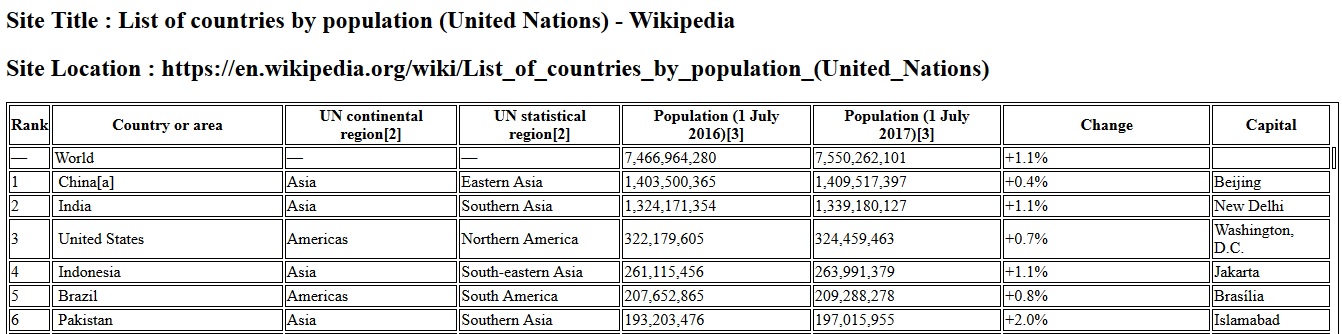
While running the application, we get result like this, which display the country details as per the link List of countries by population including the Capital city(scrape inside of each country's link) as additional column.