



In this blog, we will show you how to send SMS in your ColdFusion web application using Twilio Rest API. Here is the exposition of integration process and attached the sample code to send the SMS to user phone.
Sign up for (or log in to) a Twilio Account
Before you can receive phone calls and send messages, you'll need to sign up for a Twilio account and purchase a Twilio phone number. You can try below the link to login or create a new account. You can use this link to create a new account.
We need to login to admin console in twilio to generate the Auth_Token & Account_SID & Twilio_Number.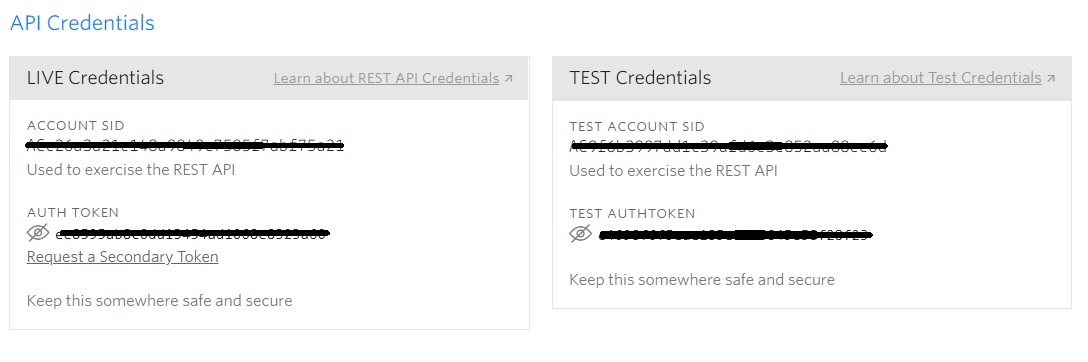
Get a phone number with SMS capabilities
Login into the Twilio console panel and go to the 'Number' menu, click on it. Here you can see the 'Get Number' and click on it. If you don't currently own a Twilio phone number with SMS capabilities, you'll need to buy one. After navigating to the Buy a Number page, check the 'SMS' box and click 'Search'. For the security and avoid spamming reasons, twilio doesn't want to "spoof" other people's mobile phone numbers. So far they only allow your "From" number to be assigned by the twilio. There you will see the list available phone number here. Twilio will generate you the new phone to use via API.
Send an SMS message in ColdFusion via the REST API
Create a message Resource
To send a new outgoing message, make an HTTP POST to this Messages list resource URI
If you want to send messages while in trial mode, you must first verify your 'To' phone number with Twilio. You can verify your phone number by adding it to your Verified Caller IDs in the console. When creating a new message via the API, you must include the 'To' parameter. This value should be either a destination phone number or a Channel address. You also need to pass a Body or MediaUrl containing the message's content.
When we posting to the twilio rest API server, all of the HTTP request must be authenticated along with the your registered SID and password as the auth token as the api credentials and this check will happened for every HTTP request.
Twilio's response
When Twilio receives your request to send an SMS via the REST API, it will check that you have included a valid Twilio phone number in the form field. Twilio will then either queue the SMS or return this HTTP error in its response to your request. We can check the error details using these Twilio response
If your request did not produce any of the errors, then twilio's HTTP response will include the SID of the new message. A sample of the twilio response might look like this,
{
	"sid": "SMxxxxxxxxxxxxxxx",
	"date_created": "Thu, 09 Aug 2018 17:26:08 +0000",
	"date_updated": "Thu, 09 Aug 2018 17:26:08 +0000",
	"date_sent": null,
	"account_sid": "ACxxxxxxxxxxxxxxxx",
	"to": "+15558675310",
	"from": "+15017122661",
	"messaging_service_sid": null,
	"body": "This is the test SMS",
	"status": "queued",
	"num_segments": "1",
	"num_media": "0",
	"direction": "outbound-api",
	"api_version": "2010–04–01",
	"price": null,
	"price_unit": "USD",
	"error_code": null,
	"error_message": null,
	"uri": "/2010–04–01/Accounts/ACxxxxxxxxx/Messages/SMxxxxxxxxxxxx.json",
	"subresource_uris": {
		"media": "/2010–04–01/Accounts/ACxxxxxxxx/Messages/SMxxxxxxxxxxxxx/Media.json"
	}
}
Lest start with the coldfusion code.
component output="false"
{
	this.name = hash( getCurrentTemplatePath() );
	this.applicationTimeout = createTimespan(0,2,0,0);

	function onApplicationStart(){
		// create an object for twilio service.
		Application.twilioService = createObject("component","com.twilio").init( accountSID = 'XXXXXX', authToken = 'XXXXXX' );
	}

	function onRequestStart(){
		if( structKeyExists(url, "reload") )
			onApplicationStart();

	}

}
In the application.cfc, have created the object for Twilio service using an 'onApplicationStart' method. The Twilio service component is available inside the 'com' folder. For authenticating the Twilio API, passed the twilioAccountSID and twilioAuthToken in the init function. For sending an SMS we need call the 'send SMS' function with from mobile number(which is generated by the Twilio console) to the mobile number(you need to provide user mobile number) and body of the message to receive the user.
component output="false" {

	public function init(
		  required string accountSID
		, required string authToken
	) {
		variables.twilioAccountSID  = arguments.accountSID;
		variables.twilioAuthToken   = arguments.authToken;

		variables.autherization = "Basic " & toBase64( variables.twilioAccountSID & ":" & variables.twilioAuthToken );

		return  this;
	}

	public struct function sendSMS(
		  required string toPhone
		, required string fromPhone
		, required string bodyOfSMS
	) {

		var _args = {
			  "To"   = { type="formField", value="#arguments.toPhone#"   }
			, "From" = { type="formField", value="#arguments.fromPhone#" }
			, "Body" = { type="formField", value="#arguments.bodyOfSMS#" }
		};

		var result = httpRequest(
			  endpoint   = "Accounts/#variables.twilioAccountSID#/Messages"
			, methodName = "POST"
			, params     = _args
		);

		return result;
	}

	// PRIVATE FUNCTIONS
	private struct function httpRequest(
		  required string endpoint
		, required string methodName
		,          struct params     = {}
	){
		var _args = { "Authorization" = { type="header", value=variables.autherization } };
		structAppend( _args, arguments.params );

		var _url = "https://api.twilio.com/2010-04-01/" & arguments.endpoint & ".json";

		var httpService = new http();

		httpService.setURL( _url );
		httpService.setMethod( arguments.methodName );

		for( var param in _args ) {
			httpService.addParam( name = param, type = _args[param].type, value = _args[param].value );
		}

		return deserializeJSON( httpService.send().getPrefix().fileContent );
	}
}
In the sendSMS.cfm we just call the sendSMS() to send a new SMS to the users. Here we passed the 'toPhone' that's receiver user phone number, 'fromPhone ' which is generated by the Twilio and 'bodyOfSMS' included the text content to send a user. For example, I just passed hardcode values as in the parameter. We can create the form to send the dynamic messages for the users.
<!--- Send an SMS --->
<cfset response = Application.twilioService.sendSMS(
	toPhone = 'XXXXXXXXXX',
	fromPhone = 'XXXXXXXXXX',
	bodyOfSMS = 'Hi test message'
)>

<cfdump var="#response#" />